
TL;DR
VideoGen is a strong AI video production suite for teams that need script-to-video workflows, stock, captions, and multilingual voiceovers. Pricing now runs on credits across Pro, Advanced, and Ultra plans. Choose Listnr if voice quality, cloning, and audio-first workflows matter more than end-to-end video automation.
VideoGen review 2026: can this AI video tool replace your editor?
VideoGen promises a familiar pitch: type a script, get a finished video with voiceover, visuals, captions, and music without living in a timeline editor. For marketers, educators, and teams shipping a lot of short social and explainers, that pitch is worth testing. The important question in 2026 is not whether AI video exists. It is whether VideoGen's current workflows, credit pricing, and output quality fit the way you actually publish.

This review is based on VideoGen's current public product and pricing pages as of September 2026, plus its help docs on credits. Pricing and credit costs can change, so confirm details on VideoGen before you buy.
So, what is VideoGen?
VideoGen is an AI video creation platform for turning scripts, slideshows, storyboards, and images into finished videos. It sits closer to an all-in-one production suite than a simple caption tool. The product emphasizes repeatable workflows, an editor with layers and transitions, AI voiceover, auto subtitles, stock footage, music matching, translation, and developer access through API and MCP tooling.
VideoGen says it is trusted by over 5 million creators and teams. That claim comes from the company itself. Treat it as marketing context, not an independent audit.
The features: what does VideoGen really do?
AI video generation and workflows
VideoGen supports script-to-video, slideshow-to-video, storyboard-to-video, image-to-video, and restyle workflows. That matters if your team needs volume more than frame-by-frame craft. You can generate a first cut quickly, then refine structure in the editor.
AI voiceover and text to speech
The product advertises 150+ AI voices and 40+ languages for voiceover, with commercial-use licensing called out on its feature pages. Speakers can be matched to different content tones, which is useful for ads, explainers, and training videos.
Auto subtitles and captions
Automatic captions are built in. For Reels, Shorts, and TikTok-style output, that is table stakes in 2026, and VideoGen includes it in the core workflow rather than treating it as an afterthought.
Stock library
VideoGen's stock footage editor page advertises 4M+ royalty-free clips included with the subscription, with commercial-use licensing and no per-clip fees according to its own FAQ. That is a major convenience if you would otherwise bounce between stock sites.
Music, translation, and localization
The suite includes AI-matched music and video translation across 40+ languages. Localization is one of the stronger reasons a team might prefer an integrated platform over stitching five separate tools together.
Editor control
VideoGen is not only a one-click generator. It markets an editor with layers, transitions, end screens, and slides so you can adjust the AI draft. That puts it ahead of tools that lock you into the first render, though it still will not feel like a full manual NLE for complex brand films.
Developer and automation layer
API access and an MCP server are included across current paid plans on the pricing page. There is also a production API add-on listed at $360 per month. That is aimed at teams automating video pipelines, not casual creators.
Pricing breakdown: how much does VideoGen cost in 2026?
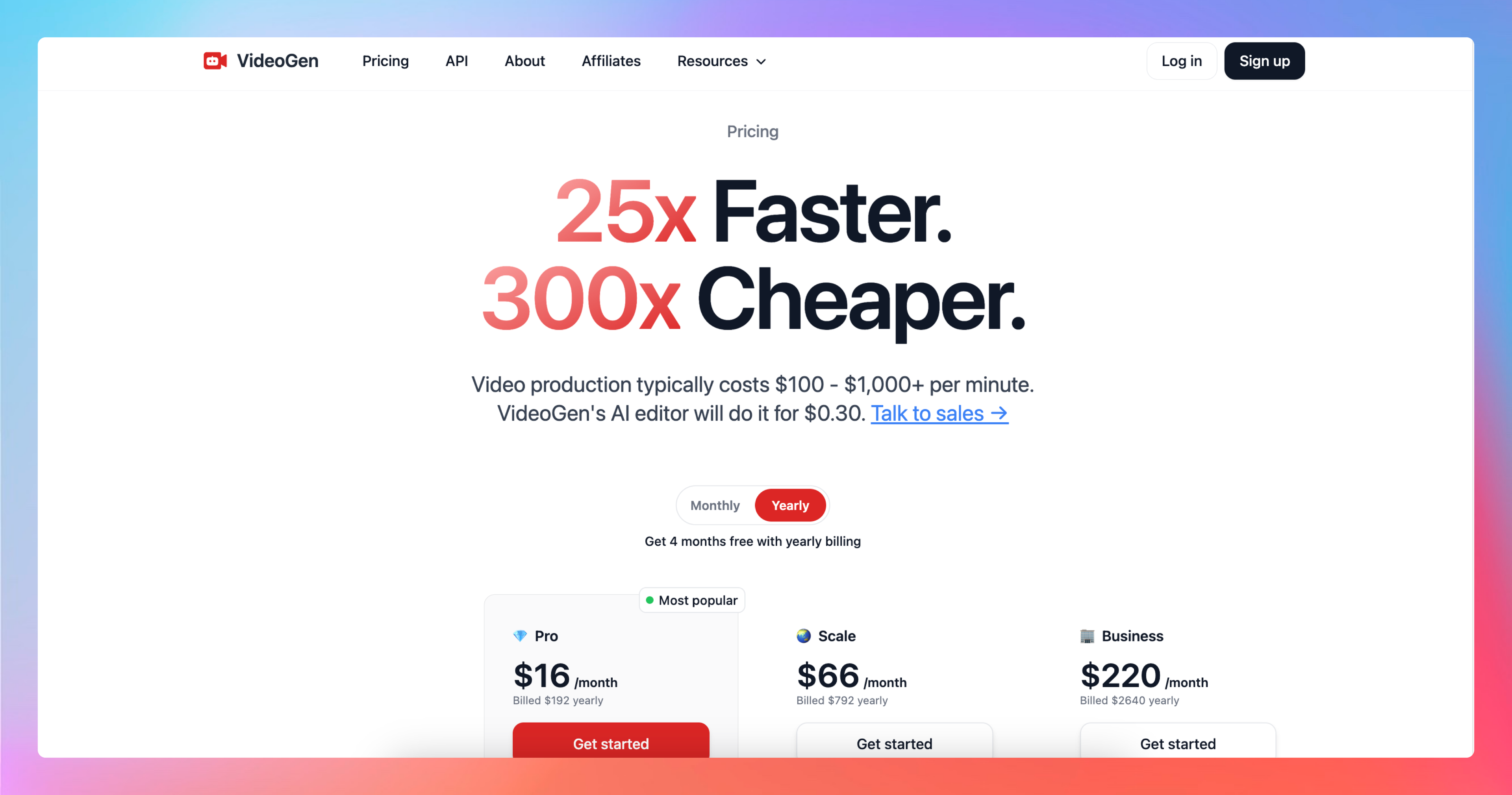
VideoGen's public pricing page currently shows yearly-billed plans with per-user monthly prices:
| Plan | Price (billed yearly) | Monthly credits | Storage |
|---|---|---|---|
| Pro | $19 per user / month | 6,000 | 15 GB |
| Advanced | $39 per user / month | 18,000 | 100 GB |
| Ultra | $99 per user / month | 60,000 | 2 TB |
Key pricing details from VideoGen's site and help center:
- AI features consume credits based on usage. The in-product rate card shows per-feature costs.
- Additional credit packs can be bought anytime.
- Credits are shared at the team level.
- All compared plans include the major workflows, API access, commercial-use rights, AI voiceover, avatars, transcription, and export.
- Max quality is listed as not included on Pro and included on Advanced and Ultra.
- Priority support, dedicated account managers, and early access are not listed as included on these self-serve tiers.
- Production API access is listed as a $360 per month add-on.
Older reviews quoted minute-based Pro / Scale / Business pricing. That model appears replaced by this credit-based Pro / Advanced / Ultra structure. If you see an outdated $16, $66, or $220 plan quoted elsewhere, treat it as stale unless VideoGen still shows it at checkout.
VideoGen also markets a free starting point on its homepage and schema markup. The exact free-tier limits were not clearly broken out on the main pricing table at the time of this review, so verify the current trial or free allowance in-product.
Pros and cons: the real story
Pros
- Fast path from script to a structured video draft
- Broad feature surface: voiceover, captions, stock, music, translation, avatars, upscaling
- Large included stock library reduces tool-switching
- Credit packs and shared team balances help variable workloads
- API and MCP access make it more interesting for automation-minded teams
- Commercial-use claims across voices and stock, according to VideoGen
Cons
- Credit pricing can be hard to estimate until you learn the rate card
- AI-first drafts can feel generic without strong human editing
- Not a replacement for high-end manual editing or highly custom brand animation
- Self-serve plans do not list priority support
- Voice depth is solid for an all-in-one video suite, but audio-first creators may want a dedicated voice tool
How VideoGen stacks up to the competition
VideoGen vs. InVideo
InVideo often appeals to people who want template-heavy social editing with more manual polish. VideoGen leans harder into AI workflows, credits, and team automation. If you want a guided template editor, InVideo may feel more familiar. If you want repeatable AI generation plus developer access, VideoGen is the more modern bet.
VideoGen vs. Pictory
Pictory is still strongest when the job is turning long-form articles or webinars into shorter videos. VideoGen covers that use case and stretches further into storyboard, image-to-video, avatars, and API automation. For blog-to-video alone, Pictory remains a focused option. For a broader production system, VideoGen looks more complete.
VideoGen vs. Listnr
This is the real fork.
- Choose VideoGen when the deliverable is a finished video and you want stock, captions, translation, and generation in one place.
- Choose Listnr when the voice is the product: Ultra-realistic narration, voice cloning, multilingual audio, podcasts, IVR, and Reels voiceovers where audio quality is the differentiator.
- Choose Listnr's AI video generator when you want Listnr's voice strengths inside a video workflow without giving up audio control.
Listnr currently markets 1,000+ voices across 142+ languages. That language and voice breadth is a different category of strength than an all-in-one video suite with 150+ voices and 40+ languages.
Who VideoGen is best for
- Marketing and L&D teams producing lots of explainers, product ads, and training clips
- Social teams that need captions, stock, and platform-ready formats quickly
- Companies that want API or MCP automation around video generation
- Creators who prefer editing an AI draft over starting from a blank timeline
Who should look elsewhere
- Voice-first creators who need the most natural multilingual narration and cloning controls
- Editors who need frame-accurate, highly custom motion design
- Buyers who want simple unlimited-minute pricing without learning a credit rate card
FAQs
What is VideoGen?
VideoGen is an AI video platform that turns scripts and related inputs into videos with voiceovers, visuals, captions, music, and editing tools in one workflow.
How does VideoGen pricing work in 2026?
Current public plans are Pro at $19, Advanced at $39, and Ultra at $99 per user per month when billed yearly. Each plan includes monthly credits and storage. Extra credits and a $360 per month production API add-on are available.
Does VideoGen include AI voiceovers?
Yes. VideoGen advertises 150+ voices across 40+ languages, with commercial-use licensing described on its voiceover feature pages.
How big is the stock library?
VideoGen's stock footage page claims 4M+ royalty-free clips included, with commercial use and no per-clip fees according to its FAQ.
Is there an API?
Yes. API access is listed on the paid plans, with production API access available as a $360 per month add-on. VideoGen also markets an MCP server.
Is VideoGen good for TikTok, Reels, and Shorts?
It is built for social and marketing formats, including captions and short-form workflows. Final performance still depends on hook quality, pacing, and whether you refine the AI draft.
How does VideoGen compare with Listnr?
VideoGen is stronger as an all-in-one video production suite. Listnr is stronger when voice realism, cloning, and multilingual audio are the priority. Many teams can use both: Listnr for the voice layer, VideoGen or another editor for final assembly.
Final verdict: is VideoGen worth it?
Yes, if you need volume video production with AI drafts, stock, captions, and multilingual voiceovers in one system. The 2026 credit-based Pro / Advanced / Ultra plans are clearer than older minute-based screenshots floating around the web, but you should model credit burn before committing a whole team.
If your bottleneck is the voice itself, start with Listnr text to speech. If you need full video automation and can live with AI-assisted visuals, VideoGen is a credible option in the current market.
Best for: marketers, educators, and teams shipping frequent social and training videos.
Look elsewhere if: you need premium voice-first control or heavy manual editorial craft.
Overall rating: 4 out of 5 for AI-assisted video teams; lower if audio quality is your main buying criterion.
Frequently asked questions
What is VideoGen?
VideoGen is an AI video platform that turns scripts and related inputs into videos with voiceovers, visuals, captions, music, and editing tools in one workflow.
How does VideoGen pricing work in 2026?
Current public plans are Pro at $19, Advanced at $39, and Ultra at $99 per user per month when billed yearly. Each plan includes monthly credits and storage. Extra credits and a $360 per month production API add-on are available.
Does VideoGen include AI voiceovers?
Yes. VideoGen advertises 150+ voices across 40+ languages, with commercial-use licensing described on its voiceover feature pages.
How big is the stock library?
VideoGen's stock footage page claims 4M+ royalty-free clips included, with commercial use and no per-clip fees according to its FAQ.
Is there an API?
Yes. API access is listed on the paid plans, with production API access available as a $360 per month add-on. VideoGen also markets an MCP server.
Is VideoGen good for TikTok, Reels, and Shorts?
It is built for social and marketing formats, including captions and short-form workflows. Final performance still depends on hook quality, pacing, and whether you refine the AI draft.
How does VideoGen compare with Listnr?
VideoGen is stronger as an all-in-one video production suite. Listnr is stronger when voice realism, cloning, and multilingual audio are the priority. Many teams can use both: Listnr for the voice layer, VideoGen or another editor for final assembly.
Final verdict: is VideoGen worth it?
Yes, if you need volume video production with AI drafts, stock, captions, and multilingual voiceovers in one system. The 2026 credit-based Pro / Advanced / Ultra plans are clearer than older minute-based screenshots floating around the web, but you should model credit burn before committing a whole team. If your bottleneck is the voice itself, start with [Listnr text to speech](https://listnr.ai/text-to-speech). If you need full video automation and can live with AI-assisted visuals, VideoGen is a credible option in the current market. **Best for:** marketers, educators, and teams shipping frequent social and training videos. **Look elsewhere if:** you need premium voice-first control or heavy manual editorial craft. **Overall rating:** 4 out of 5 for AI-assisted video teams; lower if audio quality is your main buying criterion.

About Ananay Batra
Founder and CEO @ Listnr Inc
Ananay is the Founder & CEO of Listnr AI, he started Listnr with $100 in the bank back in 2020 and scaled it to 3.5m users across 200 countries and $1.2m in revenue.
https://ananay.ai/